SIC Instant Payments
The SIC Instant Payments module provides a complete view and management interface for processing real-time credit transfers. It allows you to create, monitor, correct, approve, and settle payment transactions that are processed through the SIC (Swiss Interbank Clearing) Instant network.
It is designed to give users and operators the ability to ensure end-to-end traceability and immediate resolution of payment-related issues.
Overview
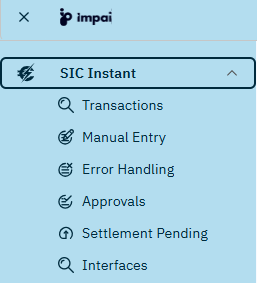
The module consists of several functional screens, each focusing on a particular stage or aspect of payment processing. To get access to these screens, open the SIC Instant menu on the left side of the screen, and
- click on the SIC Instant menu on the left side of the screen to open or close the detail menu, then
- choose one of the listed entries to open the corresponding screen.
The exact list of submenus displayed depends on your specific role and permissions and may differ from this screenshot.
Application Screens
| Screen | Purpose | Link |
|---|---|---|
| Transactions | View all payments processed through the system, including their current status and audit trail. | 👉 Go |
| Manual Entry | Create and submit new SIC Instant payments manually. | 👉 Go |
| Approvals | Approve or reject payments that require authorization before being sent to the clearing network. | 👉 Go |
| Interfaces | Monitor all inbound and outbound messages exchanged with external systems and clearing interfaces. | 👉 Go |
Each of these screens (besides Manual Entry) offers the same list-based functionality, supporting flexible filtering, sorting, exporting, and filter management. See 👉 Working with Table Views for details.
Supported Message Types
ImPAI supports the following Instant Payment message types required by the SIC IP Rulebook.
Messages are exchanged using ISO 20022 formats and extended internally with additional metadata for processing and traceability.
| Message Type | Full ISO Name | Purpose in SIC Inst |
|---|---|---|
| pacs.002.001.10.ch.02 | FI Payment Status Report | Status feedback between banks or from clearing system. |
| pacs.004.001.09.ch.02 | Payment Return | Return of funds when a credit transfer cannot be completed. |
| pacs.008.001.08.ch.02 | Financial Institution Credit Transfer | Credit transfer between banks via the clearing system. |
| pacs.028.001.03.ch.01 | FI Payment Status Request (Inquiry) | Request for payment status or investigation case. |
| camt.025.001.05.ch.02 | Receipt | Application-level receipt / acknowledgement that a message was received. |
| camt.029.001.09.ch.03 | Resolution of Investigation | Response to inquiry or recall — final or interim resolution. |
| camt.056.001.08.ch.04 | FI Payment Cancellation Request (Recall) | Request to cancel a previously sent transaction. |
Typical Workflow
A typical operator workflow for SIC Instant payments follows these steps:
- (In rare cases only) Enter a new payment using the Manual Entry screen.
- Review or modify transactions in the Transactions view.
- Handle exceptions in the Error Handling view.
- Approve payments awaiting authorization in the Approvals screen.
- Monitor pending settlements and ensure timely completion via the Settlement Pending screen.
- Verify message exchange with external systems and interface connectivity in the Interfaces screen.
- Start with 👉 Manual Entry if you are creating new transactions,
- or go directly to 👉 Transactions if you’re monitoring ongoing activity.
Key Concepts
-
Instant Execution
Payments are cleared and credited within seconds. Monitoring and response must therefore be immediate. -
End-to-End Status Tracking
Each transaction’s lifecycle can be observed across multiple states — Created → Validated → Approved → Sent → Settled → Booked. -
Real-Time Error Handling
Any error detected (format, validation, or communication) is immediately visible in the Error Handling view for prompt resolution. -
User Roles & Permissions
Access to actions like approval, retry, or settlement override depends on the user’s role. -
Auditability
Every change and action on a transaction is logged and can be reviewed for compliance.